Skip to content

Dashboard and calendar

One dashboard for the whole day

Elentra gives every learner and faculty member one dashboard for the day: today's classes and rotations, notices from the program, and the assessment tasks waiting for them. Staff schedule each event once, and it appears on the calendar of everyone it's for, on the web and in the mobile app.

Dashboard

Today, at a glance

The dashboard shows each person their day: the learning events and rotations on their calendar, notices from the program, and how many assessment tasks they have in progress.
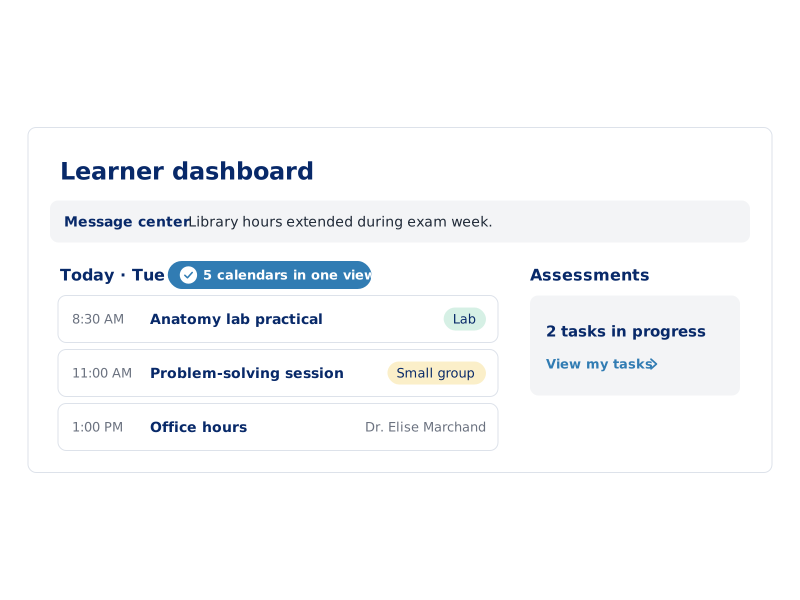
An Elentra learner dashboard showing a message center notice, today's lab, small group and office hours, and a count of assessment tasks in progress.

Scheduling

Schedule an event once, for everyone

Staff create each learning event with its type, location, faculty, audience and attendance requirements. It appears on the calendar of every learner and faculty member it's for, and attendance is recorded against it.
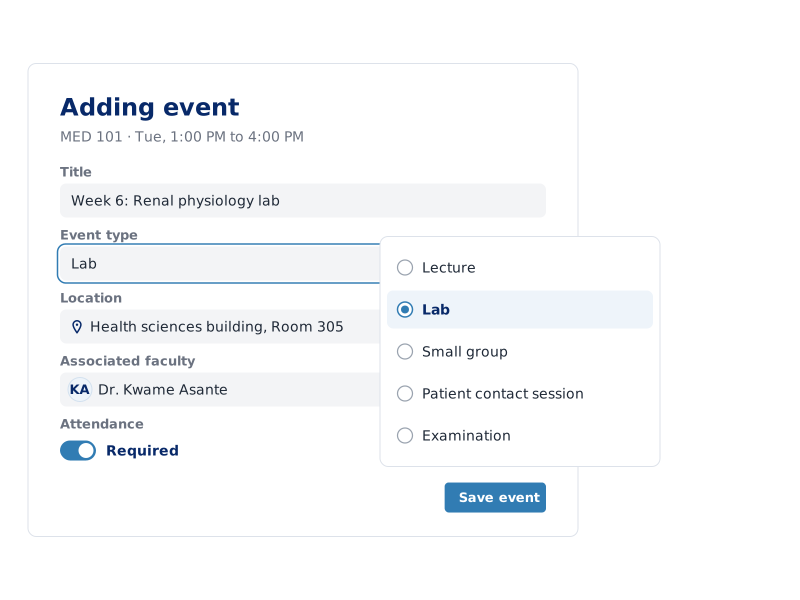
Elentra's event editor adding a renal physiology lab, with the event type list open and fields for location, faculty and required attendance.

One calendar

Classes and rotations on the same calendar

  • Mobile app

    Learners and faculty check the same schedule and notices in the Elentra app for iOS and Android.

FAQ

Questions about the dashboard and calendar

What does the Elentra dashboard show?

Each learner and faculty member's Elentra dashboard shows their day: the learning events and rotations on their calendar, notices from the program, and how many assessment tasks they have in progress.

Do clinical rotations show on the Elentra calendar?

Yes. Rotation schedules sit on the same calendar as lectures, labs and small groups, so learners see classes and clinical training in one schedule, on the web and in the mobile app.